
Sunburst Viral- Latest News on Celebrities, gossip, TV,  music and movies
No Result
View All Result
  • Home
  • Featured News
  • Celebrity
  • Movies
  • Music
  • Gossips
  • TV
  • Comics
  • Books
  • Gaming
  • Home
  • Featured News
  • Celebrity
  • Movies
  • Music
  • Gossips
  • TV
  • Comics
  • Books
  • Gaming
No Result
View All Result
Sunburst Viral- Latest News on Celebrities, gossip, TV,  music and movies
No Result
View All Result

How To Change Your Age In MultiVersus

by Sunburst Viral
2 years ago
in Movies
0
Home Movies
0
VIEWS
Share on FacebookShare on Twitter
Spread the love


Some of the content in MultiVersus has age restrictions, and there are no straightforward ways to adjust the player’s age in-game. The age restriction issue became apparent in MultiVersus’ open beta, which took place in 2022, but the full release has yet to add any way to directly alter or change player age. Although players hoped a solution would be added alongside the official launch, there are still potential workarounds that might be able to help.


After downloading and launching the platform Fighter for the first time, players will be asked to provide their ages. If players made an account during the beta and are still using that same account, then it will go off of your previous answer. Age needs to be adjusted manually, but the best method for doing so will cause all progress to be lost. For players that accidentally set the wrong age or just want to change it, the saved data needs to be erased so the age prompt appears when they relaunch the game.

MultiVersus Official Launch Key Artwork

Related

MultiVersus Review: Back & Looking To Knock Out The Competition

MultiVersus is back with its full game launch, with many technical changes and updates that could help give it an edge against the competition.


How To Change Your Age In MultiVersus

Steps To Reset Your Age On PC
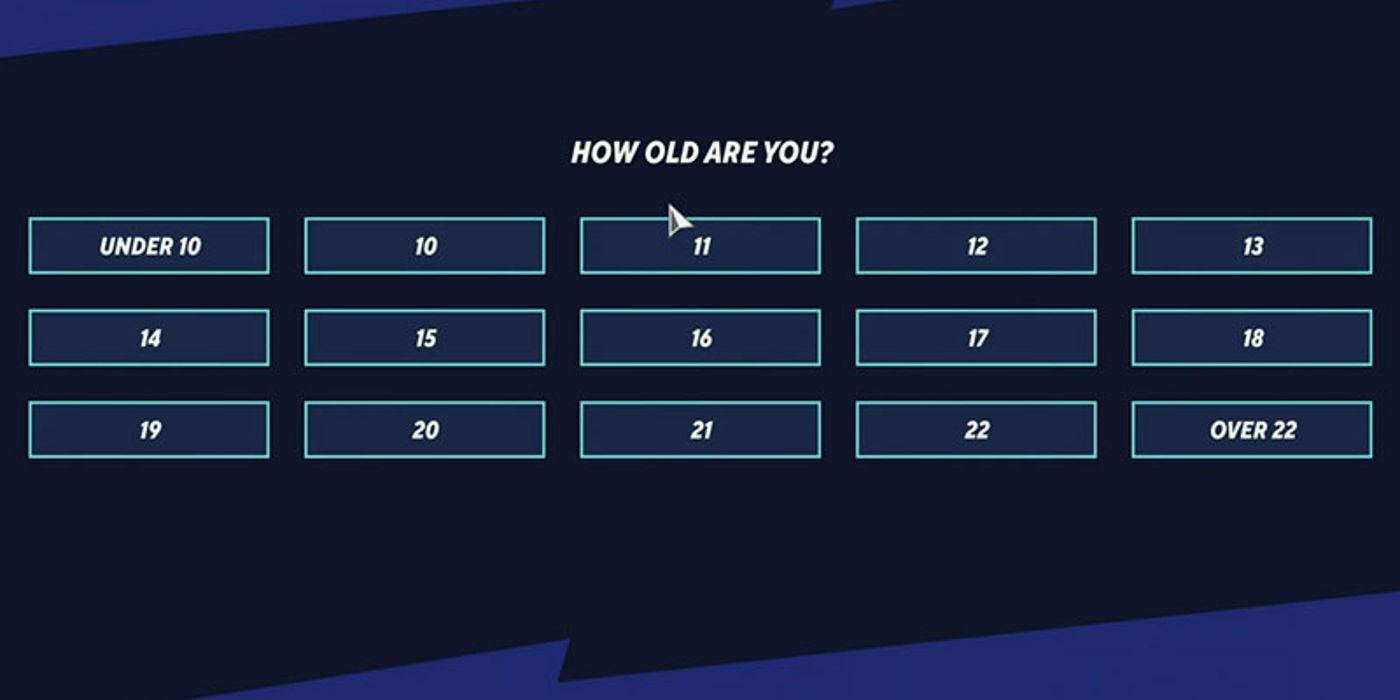

A MultiVersus menu asking the player's age

Since an age must be chosen when opening the game for the first time, players must delete all saved data and start over completely. After resetting and launching MultiVersus again, players can set their age. Unfortunately, starting over completely is the only other way to adjust the player’s age, but future updates may offer a more straightforward method. To access everything the game offers, the player’s age should be at least 18.

  • Step One: Open File Explorer
  • Step Two: Click on View, then check off the Hidden Items box so the App Data folder can be accessed
  • Step Three: Navigate to Local Disk (C) and select the correct User
  • Step Four: Open the App Data folder
  • Step Five: Select the MultiVersus folder
  • Step Six: Open the Saved folder
  • Step Seven: In the SaveGames folder, delete the firstlaunch_save.sav file
  • Step Eight: Launch MultiVersus and select the Over 22 option when prompted

The above method only works on PCs, so
console players cannot adjust their age
. Some console players have reported success by entering their console’s family or parental control options and changing the direct console restrictions.


Given that the age you select is tied to your Warner Bros. account, you may need to make an entirely new profile and start fresh. Although the full release introduced new characters such as the Joker and Agent Smith in MultiVersus, we have yet to see any way to officially navigate the age restriction problem.

MultiVersus Age Restrictions Explained

Taz looking surprised in MultiVersus

At the time of release, MultiVersus is rated T for Teen by the ESRB, with content warnings about fantasy violence and language. The full game also features several micro currencies, such as Gleamium and Prestige Points in MultiVersus, that players can buy and spend. Whenever you load up MultiVersus for the first time, you will need to select your age.


If you select an age below 13, you will not be able to access the game’s content
and will need to use the method above to get into the game. For console players, you may, unfortunately, need to create a new profile to get another chance to set your age.

If you want to access the game’s online modes, such as 1v1, 2v2, and the upcoming Ranked mode coming sometime after MultiVersus‘ Season 1, you must select 18 or above. Although you can access MultiVersus if you select anywhere in the 13–17 age range, you will be restricted to offline mode only. This means that you cannot access the game’s online features. If you have already set your age to 18 or above but are still locked in offline mode, you might want to check if you need to update MultiVersus.

MultiVersus Tag Page Cover Art

MultiVersus

Platform(s)
PC , PS5 , PS4 , Xbox One , Xbox Series X , Xbox Series S

Released
May 28, 2024

Developer(s)
Player First Games

Publisher(s)
Warner Bros. Interactive

Multiplayer
Online Multiplayer , Online Co-Op

Engine
Unreal Engine 5

ESRB
T For Teen // Fantasy Violence, Language



Source link

Tags: Agecelebrity newsChangehollywood gossipshollywood newslatest hollywood newsMULTIVERSUS
Previous Post

‘Back to Black’ Review – An Appalling Amy Winehouse Biopic

Next Post

It Will Ruin Your Career

Related Posts

Bob Dylan’s Most Complex Song Ever Written Opened His 15th Studio Album
Movies

Bob Dylan’s Most Complex Song Ever Written Opened His 15th Studio Album

by Sunburst Viral
December 22, 2025
Classic TV Shows With Only One Surviving Cast Member
Movies

Classic TV Shows With Only One Surviving Cast Member

by Sunburst Viral
December 22, 2025
Netflix Adds 7 Seasons of Hit TNT Police TV Show Today
Movies

Netflix Adds 7 Seasons of Hit TNT Police TV Show Today

by Sunburst Viral
December 22, 2025
Danny’s Boston Blue Midseason Finale Decision Explained
Movies

Danny’s Boston Blue Midseason Finale Decision Explained

by Sunburst Viral
December 22, 2025
Lola Young Returns To Social Media & Shares Mental Health Update 3 Months After Passing Out Onstage
Movies

Lola Young Returns To Social Media & Shares Mental Health Update 3 Months After Passing Out Onstage

by Sunburst Viral
December 21, 2025
Next Post
It Will Ruin Your Career

It Will Ruin Your Career

GET THE FREE NEWSLETTER

  • Trending
  • Comments
  • Latest
Taylor Swift and Matty Healy reportedly split

Taylor Swift and Matty Healy reportedly split

June 5, 2023
Nominees for Best Rap Album at 2026 Grammy Awards

Nominees for Best Rap Album at 2026 Grammy Awards

November 7, 2025
Why The Witcher Season 5 Won’t End Like the Books

Why The Witcher Season 5 Won’t End Like the Books

November 6, 2025
Love Island USA Alum Huda Mustafa Speaks Out After She & Her BF Laughed At Olandria Carthen Being Called The N-Word During Livestream!

Love Island USA Alum Huda Mustafa Speaks Out After She & Her BF Laughed At Olandria Carthen Being Called The N-Word During Livestream!

October 30, 2025
Madison Beer’s New Album ‘Locket’ Release Date Announced

Madison Beer’s New Album ‘Locket’ Release Date Announced

October 22, 2025
Carry On 2023! TV and Films We Cannot Wait to Watch

Carry On 2023! TV and Films We Cannot Wait to Watch

January 1, 2023
Sutton Stracke Fires Back at Jennifer Tilley in RHOBH Preview

Sutton Stracke Fires Back at Jennifer Tilley in RHOBH Preview

December 22, 2025
Max B Drops New Album Public Domain 7: The Purge

Max B Drops New Album Public Domain 7: The Purge

December 22, 2025
‘Call Of Duty’ Creator Vince Zampella Dead In Los Angeles-Area Car Crash

‘Call Of Duty’ Creator Vince Zampella Dead In Los Angeles-Area Car Crash

December 22, 2025
Bob Dylan’s Most Complex Song Ever Written Opened His 15th Studio Album

Bob Dylan’s Most Complex Song Ever Written Opened His 15th Studio Album

December 22, 2025
Nicki Minaj Goes Full MAGA! The Rapper Praises Trump With Erika Kirk, Reaffirms Anti-Trans Views, And Shockingly Labels JD Vance ‘Assassin’ – WATCH!

Nicki Minaj Goes Full MAGA! The Rapper Praises Trump With Erika Kirk, Reaffirms Anti-Trans Views, And Shockingly Labels JD Vance ‘Assassin’ – WATCH!

December 22, 2025
Classic TV Shows With Only One Surviving Cast Member

Classic TV Shows With Only One Surviving Cast Member

December 22, 2025
  • Home
  • Disclaimer
  • Privacy Policy
  • DMCA
  • Cookie Privacy Policy
  • Terms and Conditions
  • Contact us
SUNBURST VIRAL

Copyright © 2022 - Sunburst Viral.
Sunburst Viral is not responsible for the content of external sites.

No Result
View All Result
  • Home
  • Featured News
  • Celebrity
  • Movies
  • Music
  • Gossips
  • TV
  • Comics
  • Books
  • Gaming

Copyright © 2022 - Sunburst Viral.
Sunburst Viral is not responsible for the content of external sites.

Go to mobile version